40.7 Check Interval
40.7.1 Overview 
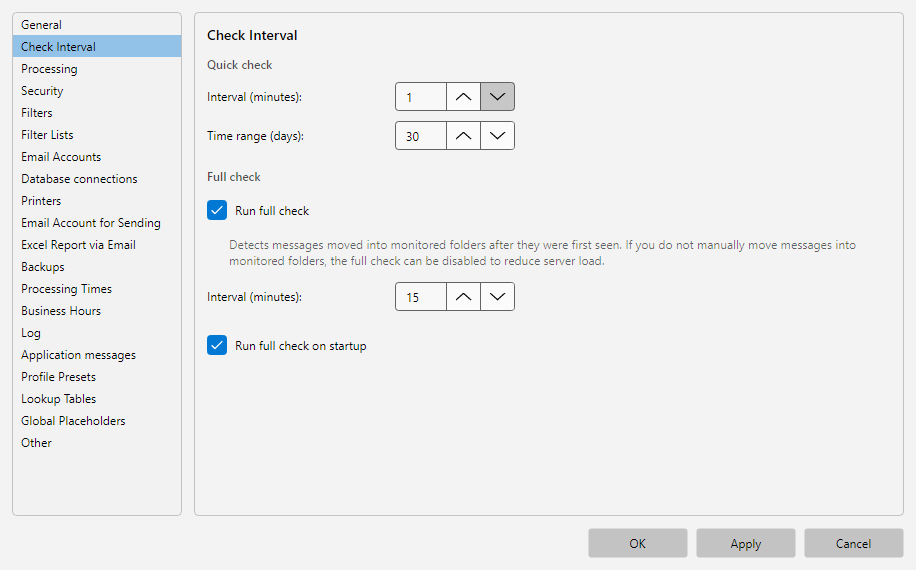
In the Check interval area you define how often the program checks the monitored mailboxes for new emails. Two check types are distinguished: the quick check (frequent, only looks at new emails) and the full check (less frequent, also checks older emails and status changes).
 Program options, Interval area: check interval in seconds with note about the processing phase and IDLE behavior
40.7.2 Quick Check 
| Field |
Description |
| Interval (minutes) |
Waiting time between two quick checks, 1-240 minutes |
| Time range (days) |
How far back the quick check considers emails |
The quick check runs at the configured interval. It is optimized for speed and typically only checks the most recent days of the inbox for new emails.
40.7.3 Full Check 
The full check is mainly used to detect older emails that were moved manually into a monitored folder.
| Field |
Description |
| Full check active |
Enables the full check |
| Interval (minutes) |
Waiting time between two full checks, 1-240 minutes |
| Also perform the full check for Microsoft 365 accounts |
Includes Microsoft 365 accounts in the full check (usually not necessary) |
| Full check on program start |
Performs a full check once directly after startup |
Use case: A server that is briefly shut down every day should perform a full check on startup - otherwise emails from the pause period may be missed. Enable Full check on program start for this.
Microsoft 365 accounts: Microsoft 365 accounts are normally synchronized via an efficient change comparison, so the full check deliberately skips them to save load. If individual folders of a Microsoft 365 account are not reliably synchronized automatically and you regularly have to catch up by hand, enable Also perform the full check for Microsoft 365 accounts. The program then also checks the entire folder contents of those accounts in every full run.
For especially robust automatic catch-up, additionally enable Full check on program start: this way every restart and every interval performs a complete comparison, and individual missed folders are reliably picked up again.
Note: The full check is slower than the quick check - especially with large mailboxes. Therefore choose a higher interval (e.g. every 60 minutes instead of every 5).
40.7.4 Tip 
- The Check now button in the status bar lets you trigger a run manually at any time, regardless of the interval.