50.5 Validation (Formal Check)
50.5.1 Overview 
Automatic X-Invoice Processor checks every e-invoice it reads against the official rule sets. This validation determines whether the invoice is formally correct - that is, whether the XML structure conforms to the schema and whether the business rules of the EN 16931 standard and of the respective specification (XRechnung, ZUGFeRD/Factur-X) are met. The check runs entirely locally on your computer. No data is transferred to an online service.
Validation is enabled by default and does not change processing: an invalid invoice still passes through the filter and the tasks as before. The result is available in addition - in the processing log, as a filter criterion, as a notification, as a validation report, and in placeholders.
What is checked
| Check |
Content |
| XML schema |
Structure of the file according to the XML schema of the syntax (UBL 2.1 or UN/CEFACT CII). Schema errors abort the further check. |
| EN 16931 business rules |
Rules of the European standard (identifiers BR-..., BR-CO-..., BR-S-..., etc.), e.g. totals checks, mandatory fields, code lists |
| Specification rules |
XRechnung 3.0: rules BR-DE-... of the KoSIT (e.g. routing ID, payment details). ZUGFeRD 2.x / Factur-X: profile rules (MINIMUM, BASIC WL, BASIC, EN 16931, EXTENDED) |
What is not checked: the invoice content (whether prices and services are correct), the tax assessment, signatures, and the PDF/A conformance of ZUGFeRD files. Validation does not replace a professional invoice review.
50.5.2 Results 
| Result |
Meaning |
| Valid |
Schema and all rules met, no findings |
| Valid with warnings |
No errors, but at least one warning (e.g. a recommendation of the standard that is not met) |
| Invalid |
At least one business rule is violated |
| Schema error |
The XML file does not conform to the schema; the rule check is skipped |
| Not checked |
No result is available - with the reason (see below) |
Reasons for "Not checked":
- Validation is switched off in the program options (see chapter 40.17).
- The file contains no XML invoice data (e.g. a plain PDF without an embedded e-invoice).
- The XML data is neither UBL nor CII (no known e-invoice format).
- ZUGFeRD 1.0: there are no current rule sets for this outdated version; the data is read but not checked.
- The time limit per file was exceeded, or the check failed technically (entry in the error log).
- The rule packages are missing from the program folder (subfolder
Validation); reinstalling the program fixes this.
Each finding consists of a severity (error, warning, or information), the rule (e.g. BR-DE-15), the rule text, and the location in the XML. The number of findings stored per file is limited (default 300, adjustable); the counters are not affected by this.
50.5.3 Which rule set applies 
The program selects the rule set based on the invoice's specification identifier (BT-24, "CustomizationID" or "GuidelineSpecifiedDocumentContextParameter"):
| Invoice |
Rule set |
| XRechnung 3.0 (UBL or CII) |
XML schema, EN 16931 and the KoSIT's XRechnung rules - the same scenario as in the KoSIT validator |
| ZUGFeRD 2.x / Factur-X (profile from the identifier) |
Profile schema and profile rules of Factur-X - as in the Mustang validator |
Plain EN 16931 invoice (identifier urn:cen.eu:en16931:2017) |
Factur-X rules in the EN 16931 profile (CII) or EN 16931 rules (UBL) |
| Other identifier (e.g. Peppol BIS, older XRechnung version) |
General EN 16931 rule set for the syntax; plus an information or a warning that no dedicated rule set exists |
Invoices with an older XRechnung version (e.g. 2.3) are checked against the current rule set. The warning AXP-VERSION points this out; individual findings may then stem from rules that did not yet exist in the older version.
The included rule packages with their date and license are shown on the Validation options page (see chapter 40.17.3). They are updated with program updates; the publishers release new versions about once or twice a year.
50.5.4 Where the result appears 
| Place |
Content |
| Log list (see chapter 6.3) |
Field group Validation with the result and the first findings; the tooltip shows all stored findings. The context menu entry Show validation report... opens the complete report. |
| Log filter and log search (see chapters 5.2 and 5.5) |
Fields Validation result and Finding (rule or text) |
| Profile filter (see chapter 30.11) |
Criteria Validation result and Finding - e.g. route invalid invoices to a clarification folder |
| Email notification (see chapter 40.6.6) |
Send message for invalid e-invoices: one message per file with the result, rule set, the first findings, and the HTML validation report as an attachment. Warnings do not trigger a message. |
| Save validation report task (see chapter 22) |
Stores the validation report as HTML and/or XML next to the invoice |
| Placeholders (see chapter 70.1) |
<ValidationStatus>, <ValidationErrorCount>, <ValidationWarningCount>, <ValidationRuleSet> - for file names, extracts, database fields, and messages |
| Result preview (see chapter 8.11) |
Line Validation with the result of the example invoice |
| Excel report (see chapter 80.3) |
Columns Validation and Findings as well as the Findings sheet |
| Menu More → Validate invoice... (see chapter 2.2.6) |
Check any file and show the report - independent of profiles and of the switch in the options |
50.5.5 The validation report 
The validation report documents the check in a traceable way. It contains:
- Program version and time of creation
- File, storage location, and the SHA-256 hash of the checked XML data - this later proves exactly which data was checked
- Invoice number, invoice date, seller, and amount
- Specification (BT-24), scenario, the rule sets used with their versions, the rule package, and the validation engine
- Result with the number of errors, warnings, and information findings
- All stored findings with severity, rule, text, and location
The HTML format is intended for reading and printing, e.g. for passing it on to the supplier. The XML format suits archive and downstream systems. Keeping the validation report together with the invoice is recommended for bookkeeping.
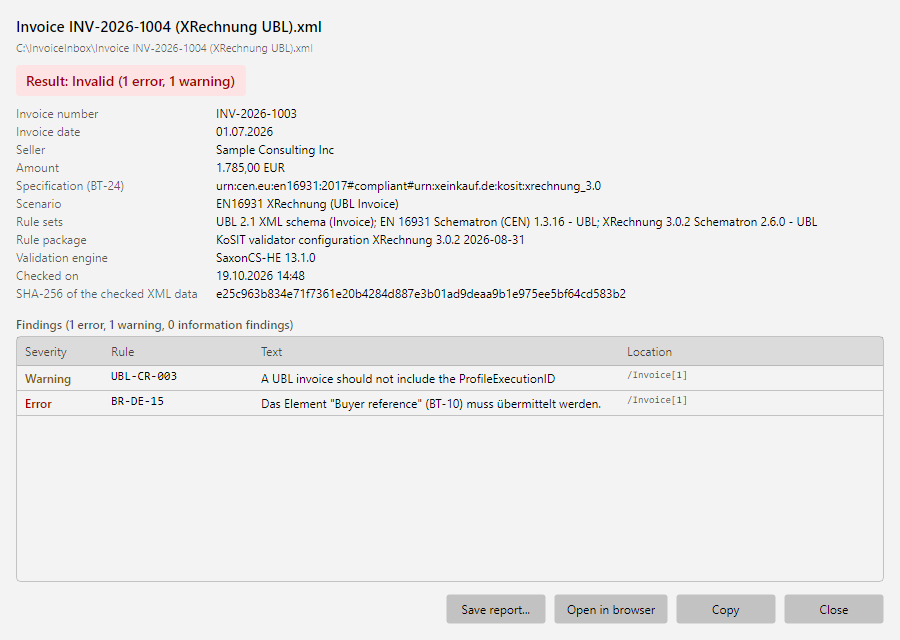 Validation report of an XRechnung with result, key data, and findings
The Validation report window shows the same information inside the program. Save report... stores it as HTML or XML, Open in browser shows the HTML version, and Copy puts the report as text on the clipboard.
Language of the finding texts
The rule texts come from the official rule sets, where they are available in English only (only KoSIT's XRechnung rules are German). The German program therefore shows its own German translation with the English original text below it - in the report window, the HTML report, and the clipboard; the XML report always contains the original text and additionally the translation (element "Translation"). The original text is authoritative. It matches the wording that the KoSIT validator or the sender's validator returns. The English program shows the original texts; the option Show validation messages in their original wording (English) (chapter 40.17) is therefore only offered in the German program.
The location is shown without the rule set's namespace details, i.e. shortened. The HTML report shows the full form on mouse-over, the XML report always contains it.
50.5.6 Typical use cases 
- Safeguard incoming invoices: route invalid invoices to a clarification folder via a filter criterion and inform accounting by email - valid invoices continue unchanged.
- Proof for the invoice: with the Save validation report task, the report is stored for every invoice - complete documentation of the formal check.
- Check your own outgoing invoices: a profile on the outgoing folder checks every generated e-invoice before it reaches the customer.
- Clarify a single case: with More → Validate invoice... you check a file manually and send the report to the supplier.
A step-by-step guide is available in the how-to "Validate e-invoices and save validation reports".