40 Program Options Overview
40.1 Overview 
The program options bundle all cross-profile settings. Opening: main menu → Options... (see chapter 2.1). Select the category on the left, the corresponding page appears on the right; OK saves and closes, Apply saves without closing, Cancel discards.
Context help: The Help (F1) link at the bottom left (or the F1 key) opens the online help chapter for the currently displayed page.
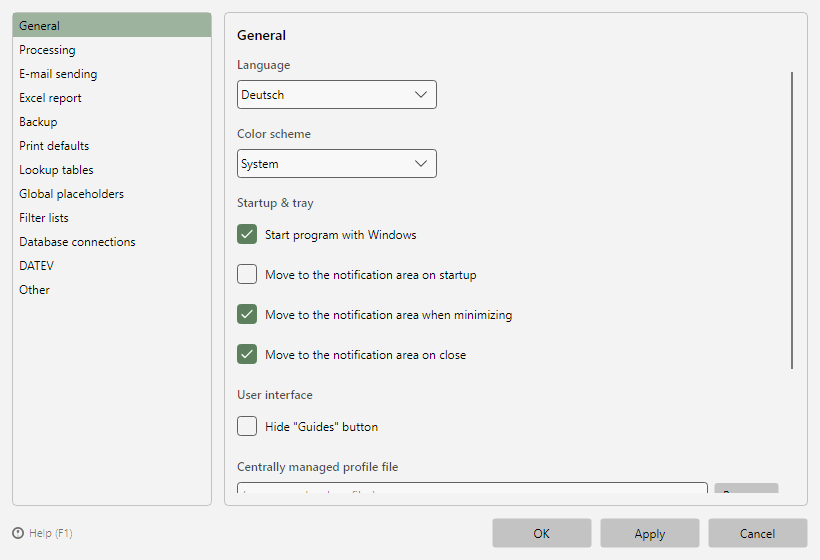 Program options with the category list on the left and the page content on the right
40.2 The pages at a glance 
| Page |
Content |
Chapter |
| General |
Language, color scheme, startup/notification area, password storage, central profile file |
(see chapter 40.5) |
| Processing |
Check interval, pauses, file timeout, time window, error/no-match filing, duplicates, email notifications, malfunction notification, check for missing processing |
(see chapter 40.6) |
| Windows service |
Operating mode "External processor", service status, set up/start/stop/correct/remove the service |
(see chapter 40.7) |
| E-mail sending |
Sending method SMTP or Exchange Online, sender, send pause |
(see chapter 40.8) |
| Excel report |
Automatic reports: schedule, period, filing/sending |
(see chapter 40.9) |
| Error report |
Error report regularly by email: schedule, recipients, only with new entries |
(see chapter 80.2.3) |
| Backup |
Automatic backups of the application data, restore |
(see chapter 40.10) |
| Print defaults |
Defaults for new print tasks and profiles |
(see chapter 40.11) |
| Lookup tables |
Value mappings for placeholders (CSV mapping) |
(see chapter 40.12) |
| Global placeholders |
Fixed name-value pairs for all profiles and tasks |
(see chapter 40.13) |
| Filter lists |
Value lists for filter criteria |
(see chapter 40.14) |
| Database connections |
Central SQL Server connections |
(see chapter 40.15) |
| DATEV |
Central DATEV master data |
(see chapter 40.16) |
| Other |
Log retention, printer check, switched-off questions |
(see chapter 40.17) |