8.6 General
8.6.1 Overview 
In the General area you define the profile's key data: active state, name, comment, color highlighting, and the behavior towards subsequent profiles.
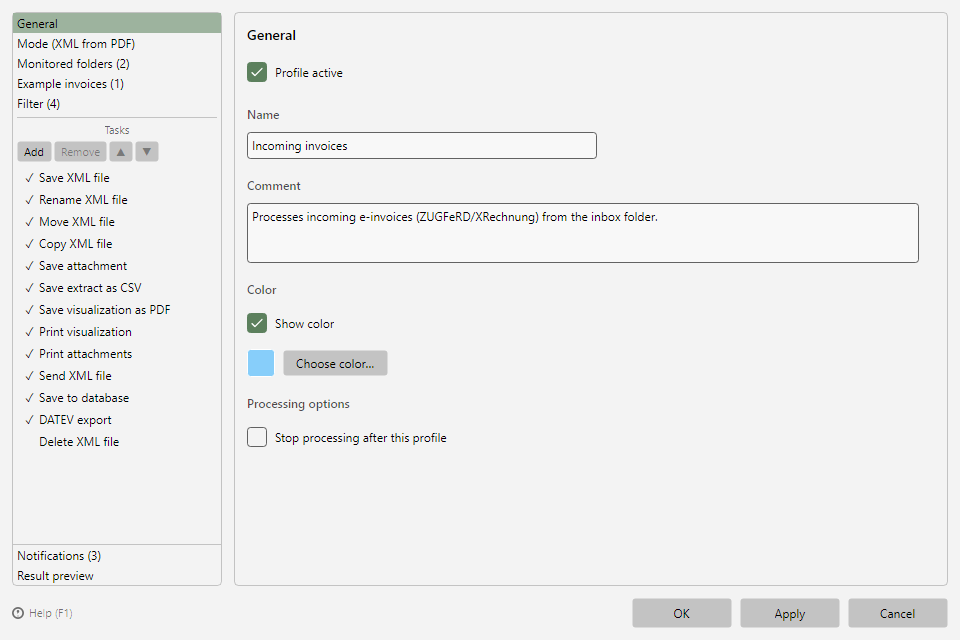 Profile settings, General area: profile-active switch, name, comment, color, and processing options
8.6.2 Profile active 
Only active profiles process files. The state can also be toggled via the checkbox in the profile list or the Activate/Deactivate toolbar buttons (see chapter 3.6). Since version 2.3.0, the time since when the profile has been active or inactive is shown next to the checkbox - for profiles from older versions only after the next switch.
8.6.3 Name and comment 
The name identifies the profile in the profile list and the processing log. The comment is free text for your own notes and appears as a column in the profile list; both are covered by the profile search (see chapter 3.9).
8.6.4 Color 
With Show color and Select color… you highlight the profile's row in the profile list - helpful to visually distinguish profile groups (e.g. per department or client). In the color dialog, the color can also be typed in as a hex value (#RRGGBB, e.g. #87CEFA; from version 2.3.0 on).
8.6.5 Processing options 
Do not apply any further profiles after successful processing with this profile: When several profiles monitor the same folder, each responsible profile evaluates a new file in the order of the profile list and processes it if its filter matches. With this option set, once the profile has successfully processed a file, subsequent profiles no longer apply to that file. A file only counts as "No match" if none of the profiles processed it. If a profile moves, renames or deletes the file, subsequent profiles no longer see it - so place such profiles at the end of the list.
Tip: In the program options under Print defaults you define whether new profiles get this option preset (see chapter 40.11).
8.6.6 Period for regular processing 
Under Warning you specify whether and from when the program warns if the profile does not process any invoice (from version 2.3.0 on, see chapter 40.6.7):
| Selection |
Effect |
| Default (45 days) |
Period from the program options; if highlighting and email are switched off there, the entry reads Default (off) |
| Custom period |
Number of days for this profile only, e.g. 400 for annual invoices; the highlighting then applies even if it is switched off in the options |
| No warning |
Neither highlighting nor email for this profile |
The email itself is enabled on the Notifications page (see chapter 8.12.2).