8.12 Notifications
8.12.1 Overview 
Here you define whether and how the profile reports processing results: by email and/or with a sound.
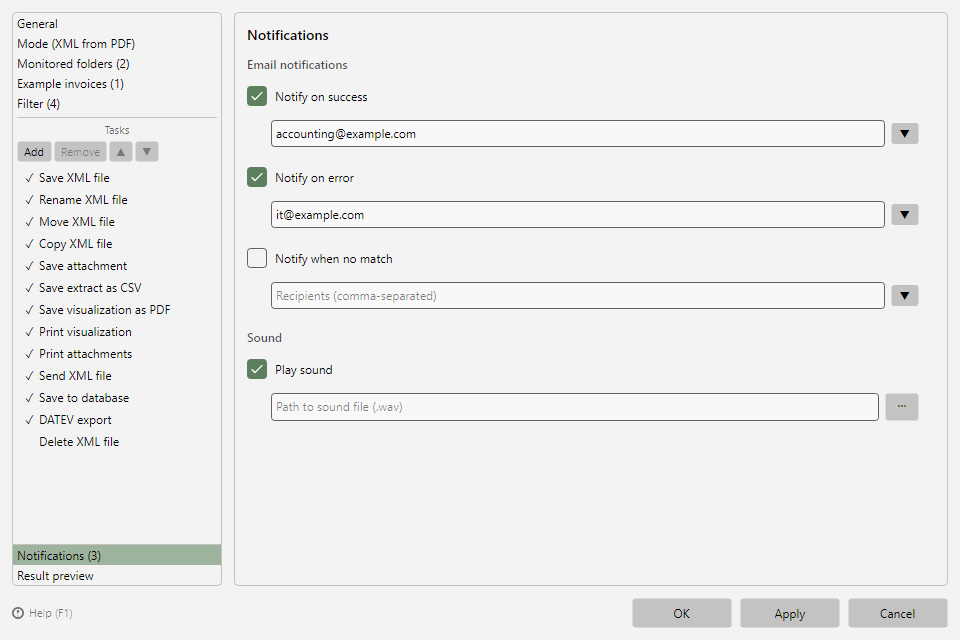 Profile settings, Notifications area with email notifications and sound
8.12.2 Email notifications 
Recipients can be stored separately for two events (multiple addresses separated by semicolons):
| Event |
Description |
| Notify on success |
An invoice was processed successfully |
| Notify on error |
An error occurred during processing |
No processing within the period (x days) (from version 2.3.0 on): a message when the profile has not processed any invoice for longer than its period (see chapter 40.6.7). You set the period on the General page (see chapter 8.6.6). To the right of the checkbox you choose where the setting comes from:
- According to options - the checkbox follows the setting in the program options and is locked.
- Individual - the checkbox applies to this profile only.
If the recipient field remains empty, the messages go to the recipients from the options. If those are missing too, a hint points out that no message is sent. If No warning is set on the General page, the whole area is locked.
Files without a filter match: Since version 2.3.0, the message for files that no responsible profile has processed is a program-wide setting (Options → Processing, see chapter 40.6.6). This way, only one message is sent per file, even if several profiles monitor the same folder - up to version 2.2, every rejecting profile sent its own. Check marks and recipients previously set in profiles are transferred there automatically the first time the new version starts; the same applies when older profiles are imported.
The ▼ button next to each recipient field lets you pick from the recently used recipients (a shared history of the last 15 addresses of all profiles and of the recipient fields in the program options; the chosen address is appended to the field). Sending uses the sending method configured in the program options (see chapter 40.8).
8.12.3 Sound 
If Play sound is enabled, the program plays the specified sound file (WAV) after a processing run. The sound is played asynchronously and does not delay processing. Without a specified sound file, the option has no effect.