40.8 E-mail Sending
40.8.1 Overview 
The E-mail sending page configures how the program sends emails - used by the Send file task (see chapter 17), the notifications (see chapter 8.12), and the report sending (see chapter 40.9).
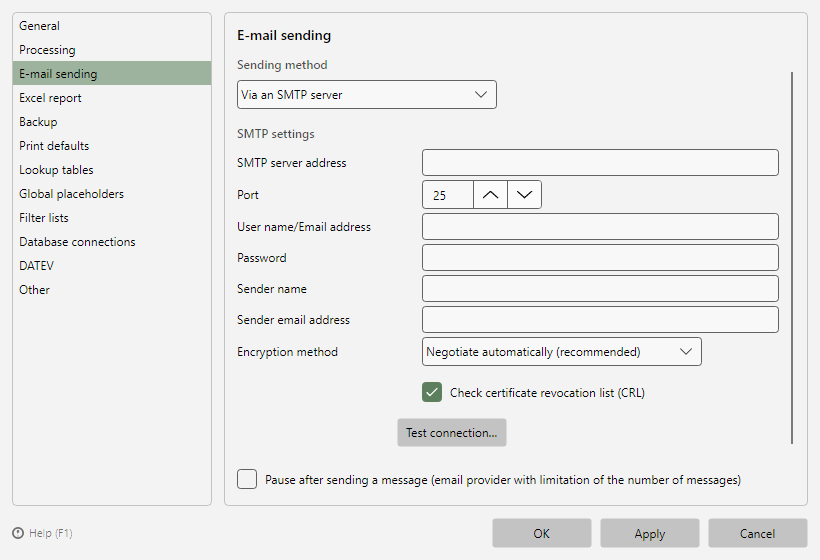 Program options, E-mail sending page
40.8.2 Sending method: via an SMTP server 
| Setting |
Meaning |
| Server, Port |
Address and port of the SMTP server |
| Encryption |
Automatic, SSL/TLS, STARTTLS only, STARTTLS when available, or None |
| User name, Password |
Credentials (storage per chapter 40.5.5) |
| Sender name, Sender email |
Display name and address of the sender |
| Check certificate revocation list (CRL) |
Checks the server certificate against revocation lists; disable if sending fails due to unreachable revocation servers |
40.8.3 Sending method: via an Exchange Online server 
Sending via a Microsoft 365 account (modern OAuth sign-in, no app password required):
- Sign in... - opens the Microsoft sign-in; afterwards the page shows display name and email address of the signed-in account
- Optionally Shared mailbox - sends on behalf of a shared mailbox (e.g.
invoices@company.com)
- Sign out removes the stored sign-in
40.8.4 Test message and send pause 
- Test connection... verifies the configuration with a test email and shows the individual steps with their results.
- Pause after sending a message: wait time after each send - for email providers limiting the number of messages. The countdown appears in the status bar (see chapter 7.2.4).