14 DATEV Export
14.1 Overview 
The DATEV export task generates DATEV accounting batches in the EXTF format (CSV, DATEV format v700) from the processed invoices - directly importable into DATEV programs such as Kanzlei-Rechnungswesen. One file EXTF_Buchungsstapel_YYYY-MM.csv is created per posting month; further invoices of the same month are appended.
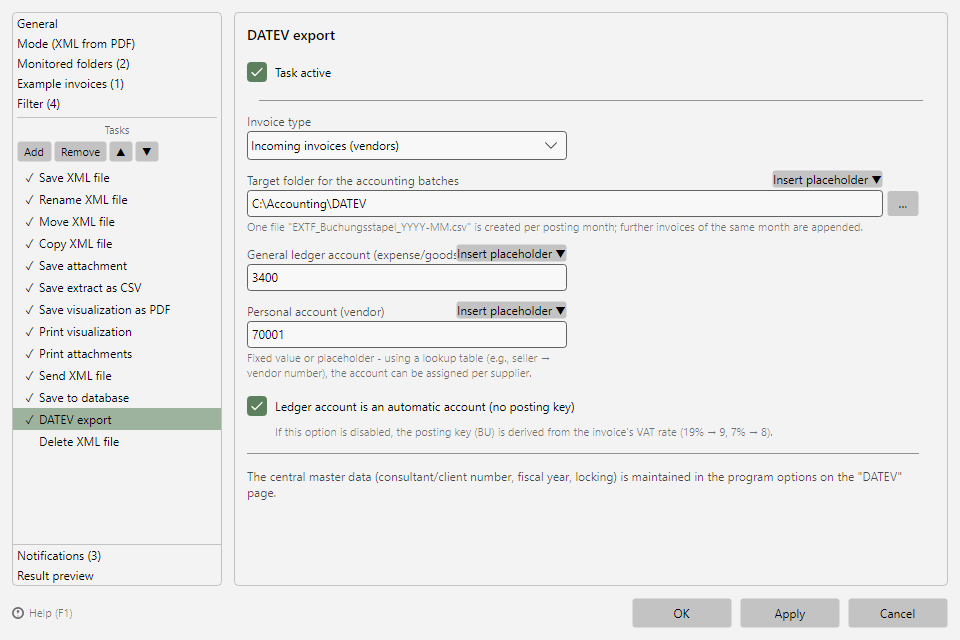 DATEV export task with invoice type, target folder, and account fields
14.2 Invoice type 
| Selection |
Meaning |
| Incoming invoices (vendors) |
Received invoices; the personal account is the vendor, the general ledger account is expense/goods received |
| Outgoing invoices (customers) |
Your own outgoing invoices; the personal account is the customer, the general ledger account is a revenue account |
The captions of the account fields adapt to the selected invoice type.
14.3 Settings 
| Setting |
Meaning |
| Target folder for the accounting batches |
Folder where the EXTF files are stored |
| General ledger account (expense/goods received or revenue) |
Fixed value or placeholder |
| Personal account (vendor or customer) |
Fixed value or placeholder |
| Ledger account is an automatic account (no posting key) |
For automatic accounts, DATEV posts the tax itself; with the option disabled, the posting key (BU) is derived from the invoice's VAT rate |
Account mapping per supplier/customer: Both account fields accept placeholders - via a lookup table (e.g. seller → vendor number) the account can be assigned automatically per business partner (see chapter 70.2).
14.4 Central DATEV master data 
Consultant/client number, fiscal year start, ledger account length, and finalization ("Festschreibung") are maintained centrally in the program options on the DATEV page (see chapter 40.16) and apply to all DATEV export tasks.
Tip: Before first production use, align posting keys, chart of accounts, and finalization with your tax office and have them run a test import.