40.5 General (Program Options)
40.5.1 Overview 
The General page bundles language, appearance, startup/notification-area behavior, password storage, and the centrally managed profile file.
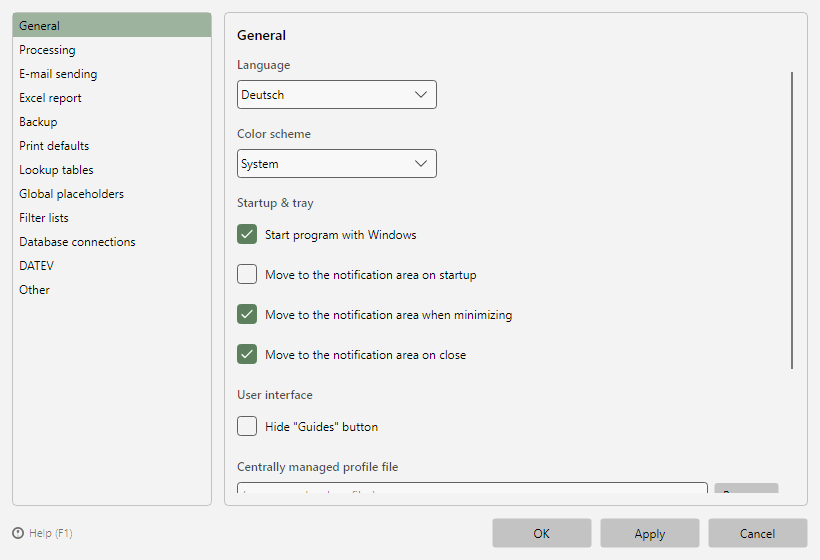 Program options, General page
40.5.2 Language and color scheme 
- Language: English or German; the change takes effect after a restart.
- Color scheme: Light, Dark, or System (follows the Windows setting).
40.5.3 Startup and notification area 
| Option |
Effect |
| Start program with Windows |
Sets up autostart (see chapter 60.1) |
| Move to the notification area on startup |
Starts minimized to the notification area (tray) |
| Move to the notification area when minimizing |
Minimizing places the window in the notification area instead of the taskbar |
| Move to the notification area on close |
Closing only hides the window - processing continues independently anyway (see chapter 60.1) |
Service operation: If a configured Windows service does the processing (option "Background processor is managed externally", see chapter 40.7), Move to the notification area when minimizing and Move to the notification area on close do not apply: minimizing places the window in the taskbar as usual, and closing exits the program. A window kept running in the notification area would bring no benefit but permanently occupy memory - the service does the processing even without an open program window. Move to the notification area on startup is not affected.
40.5.4 User interface 
- Hide "Guides" button: hides the Guides button next to the main menu (see chapter 2.3) - e.g. for tidy workstation installations. The guides remain accessible via Menu → Guides.
40.5.5 Password storage 
Defines how stored passwords (e.g. SMTP, database connections) are saved:
| Option |
Meaning |
| Windows Credential Manager (vault) |
Passwords are kept in the Windows vault of the user account (recommended) |
| Encrypted in the configuration |
Passwords are stored encrypted in the configuration files - necessary if the configuration is to be transferred between machines |
Passwords in the custom send settings of a task (see chapter 17) are stored encrypted in the profile regardless of this setting - so they also work with a centrally managed profile file, after an export to another computer and in the Windows service under a different account. A task password previously kept in the vault moves into the profile as soon as you open the custom send settings of the task and save the profile.
40.5.6 Centrally managed profile file 
For multi-workstation scenarios: all workstations use the same profile file on a network path.
- Centrally managed profile file: path to the shared file. When set, workstations without editing permission run in client mode: profile editing is locked (see chapter 3.10), changes to the central file are picked up automatically.
- Allow editing of the centrally managed profile file (admin mode): exactly one workstation should have this permission and maintain the profiles.
- Export current profiles as a profile file...: creates the central file initially from the local profiles.