40.17 Validation (Program Options)
40.17.1 Overview 
On the Validation (formal check) page, you switch the validation of e-invoices on or off and set its limits. The page also shows the included rule sets with their date and license. What validation checks and where the result appears is described in chapter 50.5.
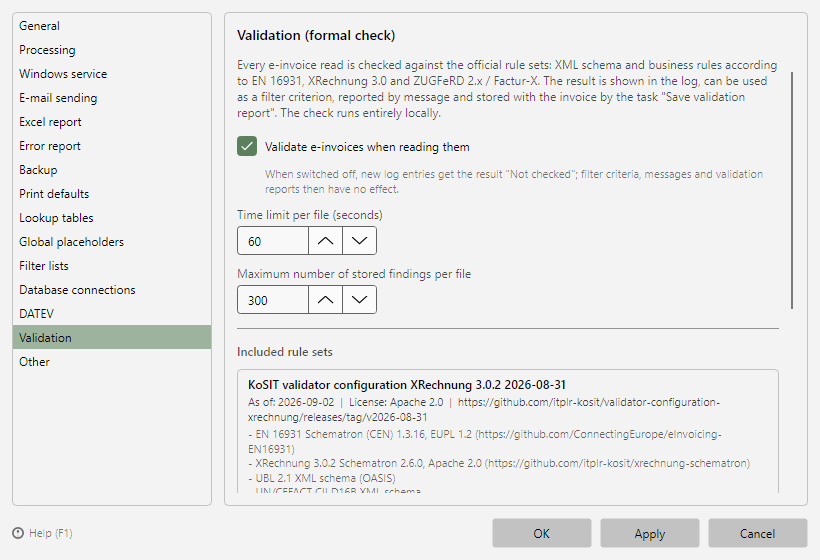 Program options, Validation page with switch, limits, and rule sets
40.17.2 Settings 
| Setting |
Meaning |
| Validate e-invoices when reading |
Default: enabled. When switched off, new log entries receive the result "Not checked"; filter criteria, messages, and validation reports related to validation then have no effect. Results already stored are kept. |
| Time limit per file (seconds) |
Default 60, adjustable from 5 to 600. If checking a file takes longer, the result is "Not checked (time limit exceeded)"; the processing of the file continues normally. Very large invoices with many items need more time. |
| Maximum number of findings stored per file |
Default 300, adjustable from 10 to 5000. Further findings are counted but not stored; the validation report then states the number of findings not stored. |
| Show validation messages in their original wording (English) |
Default: off. The rule texts of the rule sets are only available in English; without this option, the German program shows a German translation with the original text below it (see chapter 50.5.5). When enabled, only the original texts are shown. The option is only offered in the German program; the XML report always contains the original text. |
The settings apply to processing by all profiles, to the result preview, and to the Windows service. More → Validate invoice... checks even when validation is switched off (see chapter 2.2.6).
40.17.3 Included rule sets 
The lower area lists the bundled rule packages:
| Package |
Content |
| KoSIT validator configuration XRechnung |
XML schemas UBL 2.1 and UN/CEFACT CII, Schematron rules EN 16931 (CEN) and XRechnung; the basis of the KoSIT validator |
| ZUGFeRD / Factur-X |
Profile schemas and Schematron rules for MINIMUM, BASIC WL, BASIC, EN 16931, and EXTENDED from the Mustang project |
| SaxonCS-HE |
Validation engine for the Schematron rule sets (XSLT) |
For each package, the date (version or date), the license and the source are shown. Show license texts... opens the Validation\lizenzen folder in the program folder with the complete license texts (MPL 2.0, Apache 2.0, EUPL 1.2). SaxonCS-HE is the executable form of the open-source SaxonJ-HE; Saxonica publishes the source code at https://github.com/Saxonica/Saxon-HE. Notices for all other third-party components are in the file ThirdPartyNotices.txt in the program folder (link in the About dialog under Help → About). The rule sets are updated with program updates. If the Validation subfolder is missing from the program folder, a red notice appears - reinstalling the program fixes this.
Note: Validation is a formal check. The invoice content, tax details, signatures, and the PDF/A conformance of ZUGFeRD files are not checked.